Solitaire
This example deploys a solitaire game fully onchain. Every card shuffle uses Sui's Random module for verifiable randomness, every move is an onchain transaction sponsored through Enoki so players pay no gas, and the full game state (deck, columns, piles) lives in a single Game object on the blockchain.
When to use this pattern
Use this pattern when you need to:
-
Build a turn-based game where every player action is a verifiable onchain transaction.
-
Store complex game state (multiple nested structs with vectors) in a single owned Sui object.
-
Use onchain randomness for card shuffling that neither the player nor the operator can manipulate.
-
Sponsor every transaction so players interact with zero gas cost, using Enoki zkLogin for frictionless onboarding.
-
Implement drag-and-drop UI that maps user gestures to specific Move function calls.
What you learn
This example teaches:
-
Complex onchain state: The
Gamestruct contains aDeck, 4Pilefoundation stacks, and 7Columntableau stacks, each with their own card vectors and hidden card counts. All state lives in 1 owned object. -
Onchain randomness for shuffling: The
init_normal_gameandinit_easy_gamefunctions consume&Randomto shuffle the deck. Thereveal_cardhelper draws random cards during column setup and deck operations. -
Move-per-transaction: Each player action (deck flip, card move, pile placement) is a separate entry function. The frontend maps drag-and-drop events to the correct function based on the source and destination of the card.
-
Sponsored game loop: Every transaction goes through
/api/sponsor(Enoki sponsorship) → wallet sign →/api/execute. The player never pays gas. The sponsor endpoint restricts allowed Move calls to the 11 solitaire functions. -
Optimistic UI with rollback: The frontend updates the board immediately on drag-end, then sends the transaction. If the transaction fails (invalid move), it refetches the onchain game state and resets the board.
Architecture
The example has 4 actors. The Next.js frontend renders the card board with drag-and-drop, manages wallet connection through Enoki zkLogin (Google OAuth), and builds transactions for each move. Enoki handles both wallet authentication and transaction sponsorship. The solitaire Move package stores the full game state, validates every move, and consumes the Random module for shuffling and card reveals.
The following diagram traces 1 game turn: the player drags a card from a column to a foundation pile.
The following steps walk through the flow:
-
The player drags a card from a tableau column to a foundation pile. The frontend validates the move locally (color, rank, suit) using
useSolitaireGameMoves. -
The frontend updates the board optimistically (moves the card visually) and builds a
from_column_to_pileprogrammable transaction block (PTB). -
The PTB goes through the sponsored transaction flow:
/api/sponsor→ wallet sign →/api/execute. If the sponsorship request fails, see Enoki sponsorship fails. -
The Move function validates the placement rules onchain. If the source column had hidden (face-down) cards, it consumes
&Randomto reveal the next card and emits aCardRevealedevent. -
The frontend reads the
CardRevealedevent from the transaction result and updates the board state with the newly revealed card. -
If the transaction fails (the move is invalid), the frontend calls
handleFailedTransactionto refetch the full onchain game state and reset the board.
How the game state works
The entire game lives in a single Game object that the player owns. The Game struct contains:
-
deck: Deck: The draw pile withhidden_cards(count of unrevealed cards),cards(revealed deck cards), and a flag tracking whether all cards have been cycled. -
piles: vector<Pile>: 4 foundation piles (Clubs, Spades, Hearts, Diamonds), each building from Ace to King. -
columns: vector<Column>: 7 tableau columns, each with a count of face-downhidden_cardsand a vector of face-upcards. -
available_cards: vector<u64>: The pool of undealt cards used during random reveals. Because the deck and columns store only a count of hidden cards rather than their IDs, a hidden card's identity comes from this pool at the moment the game reveals it.
The game represents cards as integers 0 through 51. The suit and rank derive from the card ID: rank = id % 13 (0=Ace through 12=King), suit = id / 13 (0=Clubs, 1=Spades, 2=Hearts, 3=Diamonds). For example, card 27 is the Two of Hearts: 27 % 13 = 1 (Two) and 27 / 13 = 2 (Hearts, using integer division). Cards 0 through 25 are black (Clubs, Spades), 26 through 51 are red (Hearts, Diamonds).
Prerequisites
- Prerequisites
-
Download and install an IDE. Consider the following, because they offer Move extensions:
-
VSCode, corresponding Move extension
-
Emacs, corresponding Move extension
-
Vim, corresponding Move extension
-
Zed, corresponding Move extension
Alternatively, you can use the Move web IDE, which does not require a download. It does not support all functions necessary for this guide, however.
-
-
Node.js 18 or later
-
A Google OAuth client and its client ID. Your Google OAuth client must have
http://localhost:3000/set as an authorized JavaScript origin and authorized redirect URI. -
An Enoki app with:
-
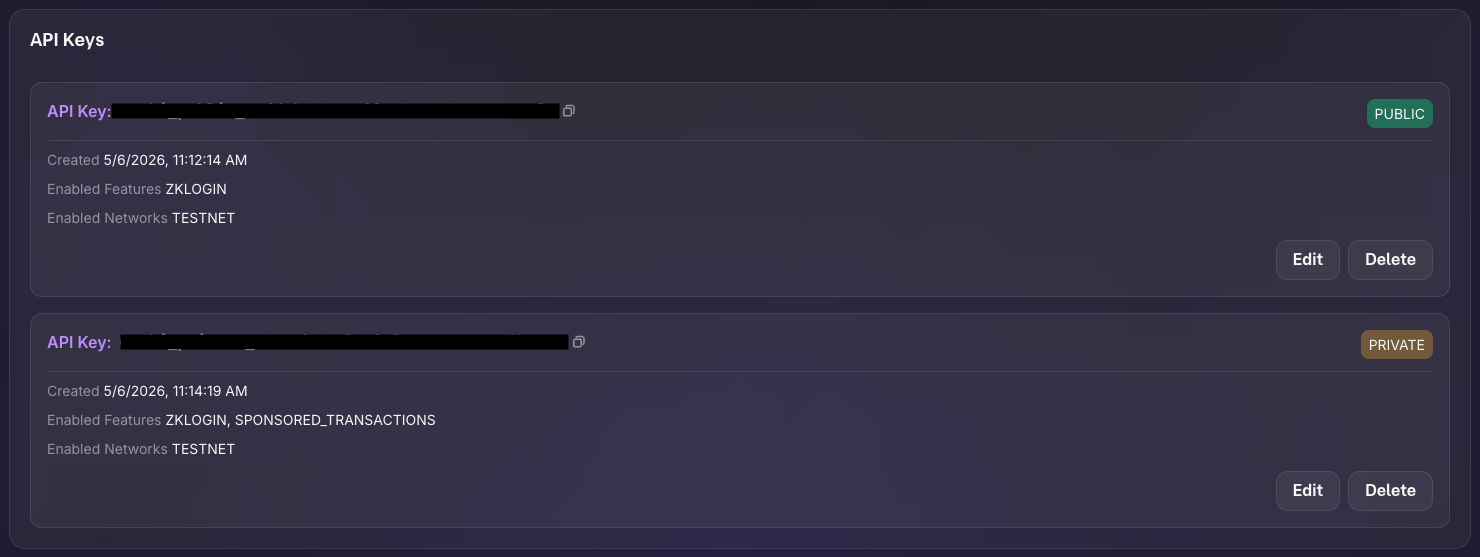
API keys (public and private) with zkLogin and sponsored transactions enabled.
-
Google configured as an auth provider using your Google OAuth client ID.
-
How to set up the example
Follow these steps to set up the example locally.
Step 1: Clone the repo
$ git clone https://github.com/MystenLabs/solitaire.git
$ cd solitaire/move/solitaire
Step 2: Publish the Move package
$ sui client switch --env testnet
$ sui move build
$ sui client publish --gas-budget 200000000
Record the package ID from the publish output. It is the PackageID value under Published Objects. The following is example output; your package ID differs. You need this value in Step 3.
│ Published Objects:                                                                               │
│  ┌──                                                                                             │
│  │ PackageID: 0x737e9eb4d0eaba283f28203cc1ee836a20f5f08e310161f1230d0735d02d3b63     <---- Package ID            │
│  │ Version: 1                                                                                    │
│  │ Digest: BMRU2zE5pNtueX89hkB1TEAA9dz2MZgVZHzWDWHt5vMt                                          │
│  │ Modules: solitaire                                                                            │
│  └──
Step 3: Configure the frontend
$ cd ../../app
$ pnpm install
$ cp .env.example .env
Edit .env with your values:
NEXT_PUBLIC_SUI_NETWORK=https://rpc.testnet.sui.io:443
NEXT_PUBLIC_SUI_NETWORK_NAME=testnet
NEXT_PUBLIC_PACKAGE_ADDRESS=PACKAGE_ID
NEXT_PUBLIC_ENOKI_API_KEY=ENOKI_PUBLIC_API_KEY
ENOKI_SECRET_KEY=ENOKI_PRIVATE_API_KEY
NEXT_PUBLIC_GOOGLE_CLIENT_ID=YOUR_GOOGLE_CLIENT_ID
ADMIN_SECRET_KEY=AN_ADMIN_SECRET
Replace PACKAGE_ID with the PackageID value you recorded from the publish output in Step 2.
Set ADMIN_SECRET_KEY as a secret value only the admin should have access to. Use a random string generator to create this value.
How to run the example
Start the frontend:
$ pnpm dev
Open http://localhost:3000 in a browser and sign in with Google. Choose Normal (standard Klondike) or Easy (Aces pre-placed). Drag cards between columns, to foundation piles, or from the deck. Each move sends a sponsored transaction. When you complete all 4 piles (Ace through King per suit), a victory modal shows your move count with a link to verify on Sui Explorer.
Key code highlights
The following snippets are the parts of the code worth reading carefully.
Game initialization with randomness
The init_normal_game function creates a new game with a shuffled deck using Sui's Random module.
move/solitaire/sources/solitaire.move. You probably need to run `pnpm prebuild` and restart the site.The function creates the Game struct, sets up 7 columns using set_up_columns (which consumes &Random to deal random cards), initializes 4 empty piles, and transfers the game to the player. The 24 remaining cards become the hidden deck.
Column-to-column move with card reveal
The from_column_to_column function moves a card (or stack of cards) between tableau columns and reveals a hidden card if the source column has face-down cards.
move/solitaire/sources/solitaire.move. You probably need to run `pnpm prebuild` and restart the site.The function validates that the target placement follows Klondike rules (alternating color, descending rank, Kings on empty columns). When the function reveals a face-down card, it calls reveal_card with &Random and emits a CardRevealed event that the frontend reads.
Card placement validation
The can_place_on_column helper validates the alternating-color, descending-rank rule for tableau moves.
move/solitaire/sources/solitaire.move. You probably need to run `pnpm prebuild` and restart the site.The function checks 2 conditions: the moving card and target card must be different colors (is_red_card returns true for Hearts and Diamonds), and the moving card's rank must be exactly 1 less than the target's rank.
Drag-and-drop to transaction mapping
The GameBoard component maps drag-end events to specific Move function calls based on the card's origin and destination.
app/src/components/gameBoard/GameBoard.tsx. You probably need to run `pnpm prebuild` and restart the site.The handleDragEnd function uses findCardOriginType to determine whether the dragged card came from the deck, a column, or a pile. Based on the source and destination types, it calls the corresponding useSolitaireActions function (for example, handleFromColumnToPile). If the transaction fails, it calls handleFailedTransaction to resync with the onchain state.
Sponsored transaction flow
The useSolitaireActions hook builds and executes sponsored transactions for every game move.
app/src/hooks/useSolitaireActions.ts. You probably need to run `pnpm prebuild` and restart the site.Each move function follows the same pattern: build a Transaction with the appropriate moveCall, send the PTB bytes to /api/sponsor for Enoki sponsorship, sign with the user's wallet, execute through /api/execute, and extract any CardRevealed events from the result to update the board state.
Common modifications
-
Add a timer: Store
start_time(already in theGamestruct) and display elapsed time in the UI. Include the time in the victory modal alongside the move count. -
Add undo support: Before each move, snapshot the board state in a local stack. On undo, pop the stack and call
handleFailedTransactionto resync. Undo does not revert the onchain transaction; it only resets the UI. -
Add a leaderboard: After
finish_game, emit aGameWonevent with the move count and elapsed time. Build a leaderboard page that queries these events through GraphQL. -
Change card visuals: Replace the SVG card images in
cardMappings.tswith custom artwork. The card IDs (0-51) deterministically map to suits and ranks.
Troubleshooting
The following sections address common issues with this example.
Google sign-in doesn't trigger login
Symptom: After authenticating with Google, nothing happens and the app prompts you to sign in again. In the browser's developer tools, you see the error {"errors":[{"code":"invalid_client_id","message":"Invalid client ID"}]}.
Cause: Enoki doesn't recognize your Google Client ID.
Fix: You need to register your Google Client ID in the Enoki dashboard:
- Go to https://enoki.mystenlabs.com
- Open your project
- Under the auth/OAuth providers section, add Google as a provider
- Enter your Google Client ID
Google sign-in fails
Symptom: The Google OAuth popup closes immediately or never appears.
Cause: The NEXT_PUBLIC_GOOGLE_CLIENT_ID is misconfigured, the redirect URI does not match http://localhost:3000/, or the browser blocks third-party cookies.
Fix: Verify the Google Client ID and authorized redirect URIs in Google Cloud Console. Try a different browser or disable cookie-blocking extensions.
Move validation rejects a valid-looking move
Symptom: A card move that looks correct on the board fails with an EInvalidPlacement or similar error.
Cause: The frontend's local validation (useSolitaireGameMoves) and the Move contract disagree on the board state. This happens when the frontend missed a previous transaction's CardRevealed event.
Fix: The handleFailedTransaction function resyncs by fetching the full onchain Game object. If this happens repeatedly, check that event parsing in useSolitaireActions correctly handles CardRevealed events.
Enoki sponsorship fails
Symptom: A move fails with a sponsorship error from /api/sponsor.
Cause: The ENOKI_SECRET_KEY is invalid, the Enoki account is rate-limited, or the Move call target is not in the allowed list.
Fix: Verify ENOKI_SECRET_KEY in .env. Check the Enoki dashboard for rate limits. Confirm getSolitaireMoveCallTargets in solitaireMoveCalls.ts includes all 11 game functions.
Game state is out of sync after page reload
Symptom: After reloading the page, the board shows an old state or no game.
Cause: The app fetches the game state from the chain on load. If the previous session deleted or finished the game, no game object exists.
Fix: Start a new game. The app detects when no active game exists and shows the difficulty selection screen. If you had an active game, getGameObjectDetails fetches the latest state from the chain.