Ticketing Platform
The ticketing platform example is a decentralized event ticketing and loyalty rewards app. Tickets are NFTs with a multi-stage lifecycle (Purchased → Attended → Collectible), minting requires a server-signed Ed25519 permit to prevent unauthorized issuance, and a loyalty points system rewards repeat attendees. Each permit carries a nonce that the onchain KeyRegistry consumes on first use, so you cannot submit the same permit twice. Enoki sponsors all transactions, so users pay no gas. The frontend uses Google OAuth through zkLogin for frictionless onboarding.
When should you use this pattern?
Use this pattern when you need to:
-
Issue NFTs that require server-side authorization before minting (prevent users from minting directly without paying or meeting conditions).
-
Implement a multi-stage lifecycle for owned objects where an admin controls the transitions.
-
Build a loyalty or rewards system that accumulates points through cryptographically signed permits.
-
Use Ed25519 signatures with nonce-based replay protection for server-to-chain authorization.
-
Combine a traditional web backend (API routes, database) with onchain NFT ownership for a hybrid app.
What does this example teach?
This example teaches:
-
Permit-based minting: The backend signs a
TicketMintPermitcontaining ticket data and a nonce. The Move contract verifies the Ed25519 signature against the stored public key in theKeyRegistrybefore minting. Users cannot mint tickets without a valid server signature. -
Typed stage transitions: Each lifecycle stage has a corresponding marker type (
Purchased,Attended,Collectible) and aStageTransition<T>object. Admins mint transition objects and send them to the ticket. The ticket module consumes the transition and updates its stage. -
Key registry with replay protection: The
KeyRegistryis a shared object that holds the Ed25519 public key and aTable<u64, u64>of used nonces. Each permit includes a nonce that the registry consumes on first use, preventing the same permit from being replayed. -
Loyalty integration: Every ticket mint awards loyalty points to the buyer's
Loyaltycard. The loyalty system uses its own permit type (LoyaltyPointPermit) with the same signature verification pattern. -
Onchain display metadata: The
display.movemodule configures how tickets and loyalty cards appear in wallets and explorers using Sui'sDisplaystandard with dynamic field templates.
Architecture
The example has 5 actors. The Next.js frontend renders event listings, ticket purchase flows, and the user's ticket wallet. The API routes handle permit signing (Ed25519), transaction sponsorship (Enoki), and user data storage (Vercel KV). Enoki provides zkLogin authentication (Google OAuth) and transaction sponsorship. The ticketing Move package manages ticket minting, stage transitions, loyalty points, and cryptographic verification. Vercel KV stores user accounts and zkLogin salt values.
The following diagram traces 1 full ticket purchase from event selection to NFT ownership.
The following steps walk through the flow:
-
The user browses events, selects seats, and clicks Purchase. The frontend sends the ticket data to
/api/permit/mint-ticket. -
The backend BCS-encodes the ticket data (serializes it into the BCS binary format that the Move contract parses), generates a random nonce, signs the payload with the admin Ed25519 key, and returns the signature, encoded bytes, and nonce.
-
The frontend builds a programmable transaction block (PTB) with 2
moveCallcommands:key_registry::new_mint_permit(which verifies the signature and consumes the nonce) andticket::mint(which creates the NFT and awards loyalty points). -
The PTB goes through the sponsored transaction flow:
/api/sponsor→ Enoki sponsorship → wallet sign →/api/execute. -
The Move contract verifies the Ed25519 signature against the
KeyRegistry's stored public key, checks that the nonce is unused, consumes the nonce, mints theTicketNFT, and adds loyalty points to the user'sLoyaltycard. -
The backend sends a second transaction to create
StageTransitionobjects (Purchased, Attended, Collectible) and transfer them to the ticket, enabling future lifecycle transitions.
Prerequisites
- Prerequisites
-
Download and install an IDE. Consider the following IDEs, which offer Move extensions:
-
VSCode, corresponding Move extension
-
Emacs, corresponding Move extension
-
Vim, corresponding Move extension
-
Zed, corresponding Move extension
Alternatively, you can use the Move web IDE, which does not require a download. It does not support all functions necessary for this guide, however.
-
-
Node.js 18 or later
-
Rust toolchain (for the relayer service)
-
A Sui wallet (Slush Wallet or another compatible wallet)
-
A Google OAuth client and its client ID. Your Google OAuth client must have
http://localhost:3000/set as an authorized JavaScript origin and authorized redirect URI. -
An Enoki app with:
-
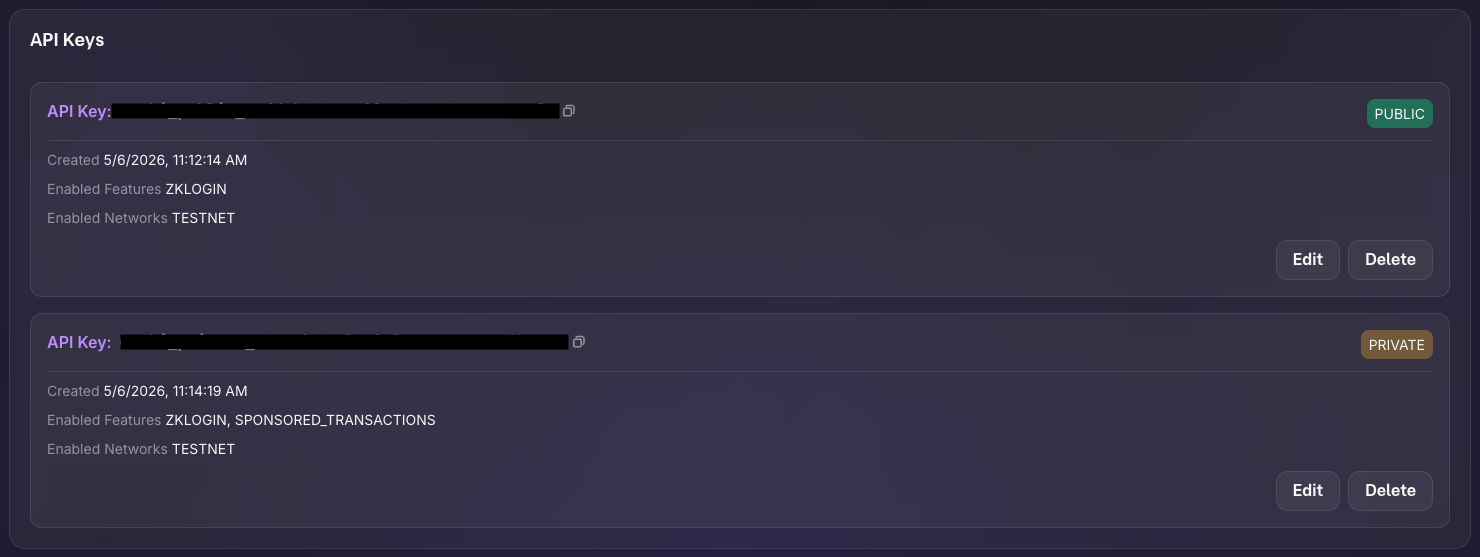
API keys (public and private) with zkLogin and sponsored transactions enabled.
-
Google configured as an auth provider using your Google OAuth client ID.
-
How do I set up the example?
Follow these steps to set up the example locally.
Step 1: Clone the repo
$ git clone https://github.com/MystenLabs/ticketing-poc.git
$ cd ticketing-poc/app
$ pnpm install
Step 2: Obtain your address's private key
$ sui client active-address
$ sui keytool convert <ADDRESS>
Replace <ADDRESS> with the address returned by sui client active-address. Copy the value that starts with suiprivkey1....
Step 3: Run setup script
The bootstrap script generates a key pair, injects the public key into the Move contract, publishes, and populates environment variables.
$ cd ..
$ ./bootstrap.sh
When prompted, enter your address's private key. Record the package ID and key registry ID from the output.
Step 4: Configure the frontend
$ cd app
$ pnpm install
Edit .env.local with the remaining secrets the bootstrap script prompts for:
NEXT_PUBLIC_ENOKI_API_KEY=ENOKI_PUBLIC_API_KEY
ENOKI_SECRET_KEY=ENOKI_PRIVATE_API_KEY
NEXT_PUBLIC_GOOGLE_CLIENT_ID=YOUR_GOOGLE_CLIENT_ID
Replace ENOKI_PUBLIC_API_KEY and ENOKI_PRIVATE_API_KEY with your Enoki app's public and private API keys, and YOUR_GOOGLE_CLIENT_ID with your Google OAuth client ID.
How do I run the example?
Start the frontend:
$ pnpm dev
Open http://localhost:3000 in a browser and sign in with Google. Browse events, select seats and a section tier, and click Purchase. The app mints a ticket NFT, awards loyalty points, and redirects to your tickets page. Each ticket shows its stage (Purchased). An admin can transition tickets through Attended and Collectible stages.
Key code highlights
The following snippets are the parts of the code worth reading carefully. They come from the ticketing-poc repo you cloned during setup, so you do not need to copy them to run the example.
Signature-verified mint permit
The new_mint_permit function verifies an Ed25519 signature against the KeyRegistry and consumes the nonce to prevent replay.
move/sources/ticket.move. You probably need to run `pnpm prebuild` and restart the site.The function takes the KeyRegistry (which holds the public key), the raw signature bytes, and the BCS-encoded ticket data. It calls assert_signature to verify the Ed25519 signature, then consume_nonce to record the nonce and prevent reuse. The mint function consumes the returned TicketMintPermit.
Ticket minting with loyalty integration
The mint function creates a Ticket NFT from a verified permit and awards loyalty points.
move/sources/ticket.move. You probably need to run `pnpm prebuild` and restart the site.The function consumes the TicketMintPermit (destroying it), parses the BCS-encoded data to extract ticket fields, creates the Ticket object, updates the user's Loyalty card with the awarded points, and emits a TicketMinted event.
Typed stage transitions
The StageTransition<T> struct uses phantom types to represent lifecycle stages: the type parameter T is one of the stage marker types and only marks which stage the transition targets. Admins create transition objects that the ticket module consumes.
move/sources/ticket_stage.move. You probably need to run `pnpm prebuild` and restart the site.Each marker type (Purchased, Attended, Collectible) has drop ability. The StageTransition<T> has key and store, making it a transferable Sui object. When an admin creates a StageTransition<Attended> and sends it to a ticket, the ticket module can consume it to advance the ticket's stage.
Key registry with replay protection
The KeyRegistry stores the Ed25519 public key and tracks consumed nonces.
move/sources/key_registry.move. You probably need to run `pnpm prebuild` and restart the site.The used_nonces table maps nonce values to the epoch in which the registry consumed them. The cleanup_nonces function lets the key owner remove old entries by epoch threshold, preventing the table from growing indefinitely.
Full ticket purchase orchestration
The useMintTicket hook coordinates the entire purchase flow across 3 API calls and 2 transactions.
app/src/app/hooks/useMintTicket.tsx. You probably need to run `pnpm prebuild` and restart the site.The hook validates that the user has a loyalty card and is signed in, generates random seat assignments, requests a signed permit from the backend, builds and executes the mint transaction, then triggers stage transition minting. Toast notifications provide feedback at each step.
Ed25519 permit signing
The /api/permit/mint-ticket route BCS-encodes the ticket data, generates a nonce, and signs the payload.
app/src/app/api/permit/mint-ticket/route.ts. You probably need to run `pnpm prebuild` and restart the site.The route reads the admin Ed25519 private key from the environment, generates a random 8-byte nonce, BCS-encodes the ticket data (matching the Move struct layout), signs the encoded bytes with the private key, and returns the signature, bytes, and nonce for the frontend to submit onchain.
Common modifications
-
Add a secondary marketplace: Let ticket holders list their tickets for resale. Create a shared
Marketplaceobject with dynamic fields for listings. The buyer pays the seller and receives the ticket through an atomic PTB. -
Add QR code check-in: At the event venue, generate a QR code from the ticket ID. A scanner app calls
update_stageto transition the ticket from Purchased to Attended, proving attendance onchain. -
Add tiered loyalty rewards: Extend the
Loyaltystruct with atierfield (Bronze, Silver, Gold). Calculate the tier from accumulated points and unlock discounts or early access for higher tiers. -
Replace Ed25519 with multisig: Require 2-of-3 admin signatures to mint tickets. Store multiple public keys in the
KeyRegistryand validate a threshold of signatures inassert_signature. -
Add event capacity limits: Store a
remaining_capacitycounter on a sharedEventobject. Decrement on each ticket mint and abort when capacity reaches 0.
Troubleshooting
The following sections address common issues with this example.
Google sign-in doesn't trigger login
Symptom: After authenticating with Google, nothing happens and the app prompts you to sign in again. In the browser's developer tools, you see the error {"errors":[{"code":"invalid_client_id","message":"Invalid client ID"}]}
Cause: Enoki doesn't recognize your Google Client ID.
Fix: You need to register your Google Client ID in the Enoki dashboard:
- Go to https://enoki.mystenlabs.com
- Open your project
- Under the auth/OAuth providers section, add Google as a provider
- Enter your Google Client ID
Google sign-in fails
Symptom: The Google OAuth popup closes immediately or never appears.
Cause: The NEXT_PUBLIC_GOOGLE_CLIENT_ID is misconfigured, the redirect URI does not match http://localhost:3000/, or the browser blocks third-party cookies.
Fix: Verify the Google Client ID and authorized redirect URIs in Google Cloud Console. Try a different browser or disable cookie-blocking extensions.
Permit signature verification fails
Symptom: The new_mint_permit call aborts with a signature verification error.
Cause: The admin private key in the backend does not match the public key stored in the KeyRegistry, or the BCS encoding of the ticket data does not match between the backend and the Move contract.
Fix: Verify the public key in the KeyRegistry matches the private key in ADMIN_PRIVATE_KEY_ED25519. Run bootstrap.sh to regenerate and re-deploy with matching keys. Ensure the BCS field order in the API route matches the Move struct layout exactly.
Nonce already consumed
Symptom: The consume_nonce call aborts because the nonce is already in the used_nonces table.
Cause: You submitted the same permit twice, or the nonce generation produced a collision.
Fix: Generate a new permit by calling /api/permit/mint-ticket again. Each call produces a fresh nonce. If collisions happen frequently, increase the nonce size from 8 to 16 bytes.
Loyalty card not found
Symptom: The ticket mint fails because the user does not have a Loyalty object.
Cause: The LoyaltyProvider auto-mints a loyalty card when a user first signs in, but the transaction might not have finalized yet.
Fix: Wait a few seconds after first sign-in for the loyalty mint to complete. The provider retries automatically. If it still fails, manually call loyalty::mint through the CLI.
Stage transition fails
Symptom: Clicking to advance a ticket's stage does nothing or shows an error.
Cause: The backend did not create the StageTransition object for the target stage or did not send it to the ticket's address.
Fix: Verify that /api/stage/mint ran successfully after the user purchased the ticket. Use sui client objects to check that the ticket's address owns the StageTransition objects.